SUMMARY: Below are some other purchase options for
your added purchase convenience. Select the one you'd
like to use and follow the directions outlined below.
As of
we accept any of these types of payment.
Payment
Options Menu: Select your payment. (or scroll
down to view your options)
We
accept most every payment method: There's several
different payment options shown below. Scroll down and
select the best option for you below. We offer these
different options to better accomodate a global audiance
needing to pay using different payment methods.
Trouble-shooting:
In case you're trying to place an order, but experiencing
any errors or difficulties, in most cases your best
option is to simply try one of the other payment options
available. Also you can do the following:
1)
Review our help section here.
Or 2) contact us and let us
know what's happening, we will be able to assist you
further.
Note:
If any one of these payment option for some reason does
not work, then please select one of the other options
avaliable from the menu. Thank you.
If
you need any help please contact us and a client support
specialist will be ready to assist you. Thank you.
Click here: MoonPay
Option Then click on the "Buy"
button and follow the instructions provided.
Supported countries: Worldwide
Use
Bitcoin Address (copy and paste this address shown
in blue):
bc1qxj9xrdmqjy548hrh2ezd7thd6j44jyr38898rg
Click
the copy button to copy our BTC code.
Then
paste it into Changelly.com
(Press: ctrl + v, or just right click
and paste)
(NOTE:
If you'd prefer to transfer to your own bitcoin wallet
first, that's perfectly fine. You'll need to first set
up your own bitcoin wallet.)
This option allowss for online bitcoin purchases using your
credit card. Some verification required. If for some
reason it doesn't work, or you encounter any issues,
then try using one of several alternatives from this
page.
Once
you've completed making payment, then click "Confirm
Payment" below.
Decide
on the Membership you want. The prices are listed
below.
Choose
Your Membership Save 50% when you order before
,
Use
Bitcoin Address (copy and paste this address shown
in blue):
bc1qxj9xrdmqjy548hrh2ezd7thd6j44jyr38898rg
(NOTE: If you'd
prefer to transfer to your own bitcoin wallet first,
that's perfectly fine. You'll need to first set up your
own bitcoin wallet.)
This option allows for online bitcoin purchases using your
credit card. Some verification required. If for some
reason it doesn't work, or you encounter any issues,
then try using one of several alternatives from this
page.
Once
you've completed making payment, then click "Confirm
Payment" below.
Decide
on the Membership you want. The prices are listed
below.
Choose
Your Membership Save 50% when you order before
,
Click here: SendWyre
Option Then click on the "Buy"
button and follow the instructions provided.
Supported countries: Worldwide
Use
Bitcoin Address (copy and paste this address shown
in blue):
bc1qxj9xrdmqjy548hrh2ezd7thd6j44jyr38898rg
(NOTE:
If you'd prefer to transfer to your own bitcoin wallet
first, that's perfectly fine. You'll need to first set
up your own bitcoin wallet.)
This option allows for online bitcoin purchases using your
credit card. Some verification required. If for some
reason it doesn't work, or you encounter any issues,
then try using one of several alternatives from this
page.
Once
you've completed making payment, then click "Confirm
Payment" below.
Decide
on the Membership you want. The prices are listed
below.
Choose
Your Membership Save 50% when you order before
,
You'll complete
your payment using Credit Card. We use a partner
site "Coinmama". They take major all major
credit cards on their ultra high security, globally
recognized sites. Choose which one you're more familiar
with or more comfortable using.
Step
1: On
your Smartphone go to the App Store. Search for:
Crypto.com. Then download the "Crypto.com App".
Then open the app.
Step
2: Using
the Crypto.com App, now click on the "Buy"
button. And choose: Bitcoin (BTC). Purchase bitcoin
in the amount of the membership you want below; by using
your credit card or debit card.
Step
3: After
you've purchased
your bitcoin with your credit card. Then click "Transfer"
and then click "Withdraw BTC"
Step
4: Send
Bitcoin Coin this Bitcoin Address (copy and paste
this address shown in blue):
bc1qxj9xrdmqjy548hrh2ezd7thd6j44jyr38898rg
Step
5: After
you've completed your credit card order, and you've
successfully transfered that bitcoin to our address,
then please click
here to send us confirmation of your payment.
Choose
Your Membership Save 50% when you order before
,
Standard
Membership:
100
paid-subs
$394
now
just
$197 USD
Advanced
Membership:
500
paid-subs
$594
now
just
$297 USD
Professional
Membership:
1000
paid-subs
$994
now
just $497 USD
Elite Membership:
2500
paid-subs
$1994
now
just $997 USD
Platinum
Membership:
5000
paid-subs
$2994
now
just $1497 USD
VIP
Membership:
10000
paid-subs
$4994
now
just $2497 USD
Supported
countries: Available in most countries
(NOTE: If you'd
prefer to transfer to your own bitcoin wallet first,
that's perfectly fine. You'll need to first set up your
own bitcoin wallet.)
This option allowss for online bitcoin purchases using your
credit card. Some verification might be required.
Once
you've completed making payment, then click "Confirm
Payment" below.
Credit
Card Option #6:(select
countries supported)[top]
Click here: https://www.luno.com (a
new window will open. Open a new account on Paybis.com
if you don't have one)
Availability
in these countries:
AUSTRALIA,EUROPE,INDONESIA,MALAYSIA,SINGAPORE,AFRICA,UNITED
KINGDOM
Step
1: Get
the Luno App for your smartphone: Luno.com
Step
2: Open
the Luno wallet app. Click on "Wallet", then
on the "currency" of your country, then "Deposit",
then on "bank transfer" (or credit card).
Step
3: Enter
the amount you want to transfer. It should be equal
to the amount of the membership plan you want. (Membership
plans listed below)
Step
4: Upload
the funds to your Luno wallet. Then click on Buy Bitcoin.
Buy in the amount of your plan. Then after you get the
bitcoin in your wallet, you'll tranfer it to our wallet
listed below.
Step
5: Send
Bitcoin Coin this Bitcoin Address (copy and paste
this address shown in blue):
bc1qxj9xrdmqjy548hrh2ezd7thd6j44jyr38898rg
Step
6: After
you've completed your credit card order, then please
click
here to send us confirmation of your payment.
Step
7: You
will receive a welcome email from us with your login
information and instructions to get started using our
system.
Credit
Card Option #7:(most
countries supported)[top]
Click here: www.paybis.com (a
new window will open. Open a new account on Paybis.com
if you don't have one)
Click
here:
www.coinbase.com A
new window will open. Open a new account if you don't
have one.
Notice:
Coinbase is one of the top rated bitcoin exchanges online.
But we don't recommend them as a first option.
Mainly because typically there can be some delays using
their service. Typically they hold your funds
for about 1-2 weeks. You can still use it and it's definitely
one of the more user friendly websites, but it's not
an instant payment option. The main thing is it works.
They
take both: 1) credit card payments or 2) bank
transfers. So you can use either one.
Instruction
Video:
This is how
to use Coinbase click
here
Step
1:
Click
Buy Now. Set
up an account on Coinbase.
Step
2:
The
login and click on the "Buy/Sell" tab
at the top
Step
3:
Next
add your payment method. ie: Credit Card, or other.
Step
4:
Click
the "Buy/Sell" tab. Then enter the Amount
of the package your ordering in USD. Then click
buy bitcoin to complete the purchase. (now the
bitcoin is in your account)
Step
5:
Next
click on Accounts. Under "BTC Wallet"
click send. Under "Recipient" enter
this code:
bc1qxj9xrdmqjy548hrh2ezd7thd6j44jyr38898rg
For
"Amount" enter the amount of the package
your buying or click on: "Send max".
Then click "Continue". Confirm payment
and click "Send". (This transfers
your payment to us to complete your order).
Step
6:
After
you've completed your credit card order, please
then click here
to send us confirmation of your payment.
Choose
Your Membership Save 50% when you order before
,
Standard
Membership:
100
paid-subs
$394
now
just
$197 USD
Advanced
Membership:
500
paid-subs
$594
now
just
$297 USD
Professional
Membership:
1000
paid-subs
$994
now
just $497 USD
Elite Membership:
2500
paid-subs
$1994
now
just $997 USD
Platinum
Membership:
5000
paid-subs
$2994
now
just $1497 USD
VIP
Membership:
10000
paid-subs
$4994
now
just $2497 USD
Supported
countries: Most countries
Credit
Card Option #9:(select
countries only)[top]
Click here: www.switchere.com (a
new window will open. Open a new account on Switchere
if you don't have one)
You'll complete
your payment using Credit Card. We use a partner
site "Paxful". They take major all major credit
cards. They're a bitcoin exchange. So you'll buy bitcoin
using your credit card. Then you'll tranfer the bitcoin
to us to complete your payment.
Decide
which plan you're going to buy. ie: Standard, Advanced,
or VIP Membership (etc...). The prices are listed
below.
Click
here to go to Paxful to order bitcoin in the amount
of your membership Click
Here (a new window will open)
Follow
the steps on Paxful to buy bitcoin in the amount of
the Membership you want to buy (video
instructions)
Once you've
successfully purchased the bitcoin, now simple complete
the transfer to our bitcoin account using these
instructions
Send
payment to our bitcoin wallet
Example:
Send exactly 197 USD in BTC to: (copy and
paste the blue code below, or scan the QR
Code to the left)
bc1qxj9xrdmqjy548hrh2ezd7thd6j44jyr38898rg
That completes
your payment to us. Once
you've completed making payment, then click "Confirm
Payment" below.
Choose
Your Membership Save 50% when you order before
,
The
login and click on the "Buy Bitcoin"
tab at the top
Step
4:
Choose
one of the available bitcoin merchants/sellers
to buy from
Step
5:
Then
enter the Amount of the package your ordering
in USD. Then click buy bitcoin to complete the
purchase. (now the bitcoin is in your account)
Step
6:
Next
click on Accounts. Under "BTC Wallet"
click send. Under "Recipient" enter
this code:
bc1qxj9xrdmqjy548hrh2ezd7thd6j44jyr38898rg
For
"Amount" enter the amount of the package
your buying or click on: "Send max".
Then click "Continue". Confirm payment
and click "Send". (This transfers
your payment to us to complete your order).
Step
7:
After
you've completed your credit card order, please
then click here
to send us confirmation of your payment.
Choose
Your Membership Save 50% when you order before
,
Step
1: Click
"Register" in the top right. Here's the instructions
to buy your bitcoin: click
here
Step
2: After
you buy your bitcoin then transfer it to us using the
instructions shown here: click
here You'll send it
to the bitcoin address you see in blue below. Copy and
paste that bitcoin address you see below into Bianance
(do not type it).
Step
3: Send
Bitcoin Coin this Address (copy and paste this address
shown in blue):
bc1qxj9xrdmqjy548hrh2ezd7thd6j44jyr38898rg
Step
4: After
you've completed your credit card order, please then
click
here to send us confirmation of your payment.
Choose
Your Membership Save 50% when you order before
,
Standard
Membership:
100
paid-subs
$394
now
just
$197 USD
Advanced
Membership:
500
paid-subs
$594
now
just
$297 USD
Professional
Membership:
1000
paid-subs
$994
now
just $497 USD
Elite Membership:
2500
paid-subs
$1994
now
just $997 USD
Platinum
Membership:
5000
paid-subs
$2994
now
just $1497 USD
VIP
Membership:
10000
paid-subs
$4994
now
just $2497 USD
Supported
countries: only certain countries
(NOTE: If you'd
prefer to transfer to your own bitcoin wallet first,
that's perfectly fine. You'll need to first set up your
own bitcoin wallet.)
This option allows for online bitcoin purchases using your
credit card. Some verification might be required.
Once
you've completed making payment, then click "Confirm
Payment" below.
Use
Bitcoin Core Address (copy and paste this address
shown in blue):
bc1qxj9xrdmqjy548hrh2ezd7thd6j44jyr38898rg
(NOTE: If you'd
prefer to transfer to your own bitcoin wallet first,
that's perfectly fine. You'll need to first set up your
own bitcoin wallet.)
This option allows for online bitcoin purchases using your
credit card. Some verification required. If for some
reason it doesn't work, or you encounter any issues,
then try using one of several alternatives from this
page.
Once
you've completed making payment, then click "Confirm
Payment" below.
Use
Bitcoin Core Address (copy and paste this address
shown in blue):
bc1qxj9xrdmqjy548hrh2ezd7thd6j44jyr38898rg
(NOTE: If you'd
prefer to transfer to your own bitcoin wallet first,
that's perfectly fine. You'll need to first set up your
own bitcoin wallet.)
This option allows for online bitcoin purchases using your
credit card. Some verification required. If for some
reason it doesn't work, or you encounter any issues,
then try using one of several alternatives from this
page.
Once
you've completed making payment, then click "Confirm
Payment" below.
You can make
payment by transferring direct from your bank account.
You'll do this using the option below:
You'll complete
your payment using our partner site "moonpay.io".
This will allow you to instantly and safely complete
payment. They accept: Credit/debt, Apple Pay, Google
Pay, Samsung Pay, and Bank transfers. They're
a bitcoin exchange and payment processor. So you'll
buy bitcoin using your method of payment. Then you'll
tranfer the bitcoin to us to complete your payment.
It's very simple and will take you less than 5 minutes
to complete.
You'll complete
your payment using Bank Transfer. We use a partner
site "Coinmama.com".
This will allow you to instantly and safely complete
payment using bank transfer. They're a bitcoin exchange.
So you'll buy bitcoin using bank transfer as your method
of payment. Then you'll tranfer the bitcoin to us to
complete your payment.
Decide
on your membership. Click on the link which will take
you to the Bank Transfer Checkout page. The prices
are listed below.
Choose
Your Membership Save 50% when you order before
,
You'll complete
your payment using Bank Transfer. We use a partner
site "Strike.me". This will allow you to instantly
and safely complete payment using bank transfer. They're
a bitcoin wallet app. Start by downloading the app.
Then you'll be able to quickly and easily buy bitcoin
using bank transfer as your method of payment. Then
you'll tranfer the bitcoin to us to complete your payment.
Decide
if you're going to buy a: Standard, Advanced, or VIP
Membership etc. The prices are listed below.
Click
here to go to Strike.me to order bitcoin in the amount
of your membership Click
Here (a new window will open)
Follow
the steps on https://strike.me to buy bitcoin in the
amount of the Membership you want to buy (video
instructions)
Once you've
successfully purchased the bitcoin, now simple complete
the transfer to our bitcoin account number shown below
in blue.
Send
payment to our bitcoin wallet
Example:
Send exactly 197 USD in BTC to: (copy and
paste the blue code below, or scan the QR
Code to the left)
bc1qxj9xrdmqjy548hrh2ezd7thd6j44jyr38898rg
Click
the copy button to copy our
BTC code. Then
paste it into Changelly.com
(Press: ctrl + v, or just right
click and paste)
That completes
your payment to us. Once
you've completed making payment, then click "Confirm
Payment" below.
Choose
Your Membership Save 50% when you order before
,
You can make
payment by transfering direct from your bank account.
You'll do this using either of the two options below:
Option
#1:Paxful.
(this payment method is instant)
You'll complete
your payment using Bank Transfer. We use a partner
site "Paxful". This will allow you to instantly
and safely complete payment using bank transfer. They're
a bitcoin exchange. So you'll buy bitcoin using bank
transfer as your method of payment. Then you'll tranfer
the bitcoin to us to complete your payment.
Decide
if you're going to buy a: Basic, Advanced, or VIP
Membership. The prices are listed below.
Click
here to go to Paxful to order bitcoin in the amount
of your membership Click
Here (a new window will open)
Follow
the steps on Paxful to buy bitcoin in the amount of
the Membership you want to buy (video
instructions)
Once you've
successfully purchased the bitcoin, now simple complete
the transfer to our bitcoin account using these
instructions
Send
payment to our bitcoin wallet
Example:
Send exactly 197 USD in BTC to: (copy and
paste the blue code below, or scan the QR
Code to the left)
bc1qxj9xrdmqjy548hrh2ezd7thd6j44jyr38898rg
Click
the copy button to copy our
BTC code. Then
paste it into Changelly.com
(Press: ctrl + v, or just right
click and paste)
That completes
your payment to us. Once
you've completed making payment, then click "Confirm
Payment" below.
You can make
payment by using bitcoin online. Click on the package
you want, then click on "Bitcoin", and follow
the instructions outlined on that page:
Use
Bitcoin Coin Address (copy and paste this address
shown in blue):
bc1qxj9xrdmqjy548hrh2ezd7thd6j44jyr38898rg
Choose
Your Membership Save 50% when you order before
,
Standard
Membership:
100
paid-subs
$394
now
just
$197 USD
Advanced
Membership:
500
paid-subs
$594
now
just
$297 USD
Professional
Membership:
1000
paid-subs
$994
now
just $497 USD
Elite Membership:
2500
paid-subs
$1994
now
just $997 USD
Platinum
Membership:
5000
paid-subs
$2994
now
just $1497 USD
VIP
Membership:
10000
paid-subs
$4994
now
just $2497 USD
Once
you've completed making payment, then click "Confirm
Payment" below.
If
you tried using coinbase
but for some reason was not successful. (ie: they
don't run in your country) then here's a few alternatives.
They allow you to buy bitcoin. Once you buy your bitcoin
using your credit card, or bank transfer, then you
can complete payment for your membership by transfering
the bitcoin to us. During checkout it will ask you
for a bitcoin address (BTC) use the following: bc1qxj9xrdmqjy548hrh2ezd7thd6j44jyr38898rg
Coinmama
worldwide / similiar to
coinbase / popular (best option)
Paxful.com popular / no ID required
/ Accepts all payment types: paypal,
credit cards, bank, more (best option)
Cryptolocally.com popular / Escrow / Accepts
all payment types: paypal, credit cards, bank, more
beta.transak.com popular / switch where
it says ETH to BTC / Accepts: credit cards, bank
cards
Strike.me Strike app is available in the United
States (excluding Hawaii and New York) Video
tutorial
Cash
Moneypopular
/ very easy/
pay at your local bitcoin atm / for locations
Google search: bitcoin ATM
*NOTE:
If you have a problem, or want to see how any
of these work, just do a youtube search for the name
of the processor you want to use from above. ie: "how
to use coinmama" ...or... "how to use Paxful"
. That will bring up the latest video showing you
how to use their payment system. You'll simply purchase
bitcoin using their system and then send it to us
as payment to this bitcoin address: bc1qxj9xrdmqjy548hrh2ezd7thd6j44jyr38898rg
**NOTE:
if you tried all these and can't seem to get bitcoin
exchanges to work, then you can always use just a
cash payment. It can be sent to us directly using
your local bitcoin ATM. Follow the steps
here.
Once
you've completed making payment, then click "Confirm
Payment" below.
CASH OPTION 1: Using Cash Money at Your
Local Bitcoin ATM:[top]
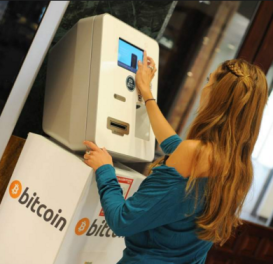
This
is probably the simpliest option. You just go to your
bank. Get cash. Then go to your local bitcoin ATM and
you can complete payment direct to us by following the
steps below.
SUMMARY:
If you want to pay with plain old cash, it's easy. Just
follow the steps below.
You'll
go to your local bitcoin ATM and simply make
a deposit and you're done. Follow these simple steps
by pay with cash.
Using Paper Cash Money at Your Local
Bitcoin ATM:
STEP
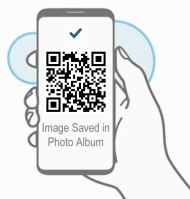
1: Using your smart phone take a screen shot,
or photo of this QR code image you see below:
bc1qxj9xrdmqjy548hrh2ezd7thd6j44jyr38898rg
STEP
2: Open google (or google maps).
Search
for: bitcoin ATM ... or .... bitcoin ATM
+ (name of your town, city) ie: bitcoin atm Miami
FL.
Typically
this should bring up the location of your local bitcoin
ATM machine. Usually they're located in places like
neighborhood shopping malls and coffee shops.
Check
to ensure it's both working and that you're going there
during their open business hours. (call ahead if it's
at say a coffee shop)
STEP
3: Go to the Bitcoin ATM. Bring with
you: 1) smartphone with image of
bitcoin QR code above. 2) cash money
Confirmed
Location
Smart
Phone With Photo
Cash
Phoned
Ahead:
The
Bitcoin ATM is working.
I
have the address.
The
Coffee shop where it's located is open until
9pm. I'm good to go!"
STEP
4: Follow the steps shown on the ATM screen. Each
bitcoin ATM is different. Most are easy to use and very
user friendly. Just be sure to bring your smart phone
with you to the ATM.
The ATM
will ask if you're "Buying" or "Selling"
bitcoin. Select "Buying".
Then the
ATM will ask you to scan the QR code. Open the QR
code. Then simply hold your phone up to the ATM scanner.
After
the ATM reads the QR code, it will ask you to input
your cash. Input:
STANDARD:
197 USD, or ADVANCED:
297 USD, or PROFESSIONAL:
497 USD,
VIP:
997 USD, or ELITE:
1497 USD
Billed
in one lump sum payment.
Simple way to pay with cash, if you don't have
a credit card.
After
you feed your cash into the ATM machine it will provide
you with a confirmation receipt. Keep that.
Sometimes
it's a paper receipt, sometimes it's just a confirmation
on the screen. If it's just on the screen please take
a photo of it. (Don't lose your confirmation).
STEP
5: Once you've completed using the ATM, and made
payment, then click "Confirm Payment" below
to complete the transaction. We will then confirm your
payment has arrived. After we've confirmed your payment
you will get a "welcome email" with your login
info. Thank you.
This
is an alterntive cash option if for some reason your
options are limited. You can go to Walmart and get a
credit card quite easily at the customer service desk.
Most people are approved. Once you get your walmart
credit card, then you can either use "Cash
Option 1" above.
PayPal Options:[top] You
can buy bitcoin using your PayPal account, then transfer
the bitcoin to us. You can use any of these 3 sites
to buy bitcoin with PayPal.
Another
option would be to withdraw your PayPal funds back to
your bank account. Then once you have the funds back
in your bank, you can use one of our other payment options
such as paying by cash here.
Then
you will transfer the bitcoin to us at this bitcoin
address: (copy and paste): bc1qxj9xrdmqjy548hrh2ezd7thd6j44jyr38898rg
cash.appU.S. Residents
Only: This is one of the fastest and easiest
order options we have. Just take out your smartphone,
download the Cash App and send payment. Follow the steps
below to begin. Random Cash App: Video
Instructions
STEP 1:
Download the cash app: https://cash.app
Or... in your smart phone app store search: Cash
App. The icon looks like this:
STEP 2:
Register and link your banking info.
STEP 3:
Buy bit coin in the amount of level of membership
you want. (price list below)
STEP 4:
Send the bitcoin to this address below in blue:
Send
payment to our bitcoin wallet
Example:
Send exactly 197 USD in BTC to: (copy and paste
the blue code below, or scan the QR Code to the
left)
bc1qxj9xrdmqjy548hrh2ezd7thd6j44jyr38898rg
Click
the copy button to copy our BTC
code. Then
paste it into Changelly.com
(Press: ctrl + v, or just right
click and paste)
STEP 5:
After sending payment in bitcoin to the above address
click "Confirm Payment" below.
Choose
Your Membership Save 50% when you order before
,
If you use
or are comfortable with using any kind of online wallet
such as:
Skrill,
Neteller, Google Pay, Apple Pay, PayPal, Perfect Money,
Venmo, PaySafe Card, WebMoney, OKPay, ECO, UPay Card,
or some other e-wallet.
Any of these
can be used to easily make your payment online using
our partner site: Paxful, (just below)
which will allow you to buy bitcoin using most any online
wallet.
To complete
your payment using most any online wallet.
Decide
if you're going to buy a: Basic, Advanced, or VIP
Membership. The prices are listed below.
Click
here to go to Paxful to order bitcoin in the amount
of your membership Click
Here (a new window will open)
Follow
the steps on Paxful to buy bitcoin in the amount of
the Membership you want to buy (video
instructions)
Once you've
successfully purchased the bitcoin, now simple complete
the transfer to our bitcoin account using these
instructions
Send
payment to our bitcoin wallet
Example:
Send exactly 197 USD in BTC to: (copy and
paste the blue code below, or scan the QR
Code to the left)
bc1qxj9xrdmqjy548hrh2ezd7thd6j44jyr38898rg
Click
the copy button to copy our
BTC code. Then
paste it into Changelly.com
(Press: ctrl + v, or just right
click and paste)
That completes
your payment to us. Once
you've completed making payment, then click "Confirm
Payment" below.
Choose
Your Membership Save 50% when you order before
,
STEP 1:
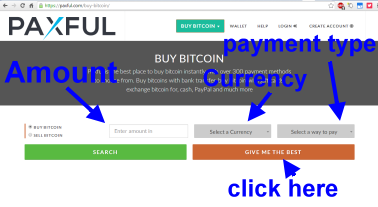
Click on one of the 3 links above. Then simply select
your: "Amount", "Currency" and "Payment
Type" then click "find best".
STEP 2:
On the next screen you'll create a bitcoin wallet.
Then simply click on "Create Free Account".
STEP 3:
Follow the instructions and steps to buy your bitcoin
provided on PAXFUL
STEP 4:
After you've bought the Bitcoin using your online
wallet. Then send the bitcoin to this address below
in blue:
Send
payment to our bitcoin wallet
Example:
Send exactly 197 USD in BTC to: (copy and paste
the blue code below, or scan the QR Code to the
left)
bc1qxj9xrdmqjy548hrh2ezd7thd6j44jyr38898rg
Click
the copy button to copy our BTC
code. Then
paste it into Changelly.com
(Press: ctrl + v, or just right
click and paste)
STEP 5:
After sending payment in bitcoin to the above address
click "Confirm Payment" below.
Choose
Your Membership Save 50% when you order before
,
Standard
Membership:
100
paid-subs
$394
now
just
$197 USD
Advanced
Membership:
500
paid-subs
$594
now
just
$297 USD
Professional
Membership:
1000
paid-subs
$994
now
just $497 USD
Elite Membership:
2500
paid-subs
$1994
now
just $997 USD
Platinum
Membership:
5000
paid-subs
$2994
now
just $1497 USD
VIP
Membership:
10000
paid-subs
$4994
now
just $2497 USD
Option
2: (this company is another top rated place to buy
bitcoin. They accept most every payment method)
Localbitcoins.com
- This is how to use Localbitcoins.com click
here . Localbitcoins allows you to use a variety
of different payment methods to purchase bitcoin. Once
you do that, just transfer your payment to our bitcoin
address below (shown in blue). Once you do that send
us the payment confirmation
here and we'll open your account and get started. Thanks.
Home:To
go back to the index page to see the memberships from
the beginning.
click
here
Instruction
Video:This is how
to use Coinbase click
here
Instruction
Video:This is how
to use Binance click
here
Localbitcoins.com
- This is how to use Localbitcoins.com click
here . Localbitcoins allows you to use a variety
of different payment methods to purchase bitcoin. Once
you do that, just transfer your payment to our bitcoin
address below (shown in blue). Once you do that send
us the payment confirmation
here and we'll open your account and get started. Thanks.
Instruction
Video: This
is how to use Coinmama click
here
(easy
way to order with credit card. You'll buy bitcoin with
your credit card. Then send the bitcoin to our bitcoin
address here:
Send
payment to our bitcoin wallet
Example:
Send exactly 197 USD in BTC to: (copy and paste
the blue code below, or scan the QR Code to the
left)
bc1qxj9xrdmqjy548hrh2ezd7thd6j44jyr38898rg
Click
the copy button to copy our BTC
code. Then
paste it into Changelly.com
(Press: ctrl + v, or just right
click and paste)
Please
Read:Still
having difficulty making payment. No problem. In the
rare event sometimes one of these methods might not
work for everyone. Depending on for example what country
you're located in. Below we'll try and walk you through
a few solutions ok.
Troubleshooting:Here are a few options to try to solve your
issue:
1)
Contact Us: click
here
- Let us know what "country"
you're located in, and what "method of payment"
you're wanting to use. ie: Credit card, Bank transfer,
or other. And we will help walk you through how to complete
your order.
2)
Bitcoin: - This is a superfast way to pay.
But lets say the bitcoin options we provided such as
using "coinmama" aren't working for you for
some reason. This could happen depending on your geography.
So
what you'll do is Google Search: your
country name + buy bitcoin. ie: US
buy bitcoin ie: Australia
buy bitcoin. or ie: UK
buy bitcoin. This will bring up the latest
and best options available to someone in your country.
You'll be able to make your purchase using your major
credit card, or bank transfer. That will allow you
to buy the bitcoin in the amount of your order.
Then
you'll simply transfer it to our bitcoin address displayed
below
in "Blue". So for example to order you'll
buy $197 worth of BTC. Then just transfer that BTC
to our address below. It's an easy way to complete
your transaction. bc1qxj9xrdmqjy548hrh2ezd7thd6j44jyr38898rg
Once you've
completed transfering the bitcoin to our address,
then to confirm your payment click
here
Send
payment to our bitcoin wallet
Example:
Send exactly 197 USD in BTC to: (copy and paste
the blue code below, or scan the QR Code to the
left)
bc1qxj9xrdmqjy548hrh2ezd7thd6j44jyr38898rg
Click
the copy button to copy our BTC
code. Then
paste it into Changelly.com
(Press: ctrl + v, or just right
click and paste)
3) Cash:
click
here-
Cash payments are very easy to do
as well. Just go to your bank or ATM. Withdraw the amount
of cash required to complete your purchase. Then go
to your local Bitcoin ATM, and deposit the cash. The
bitcoin atm will ask you for the bitcoin address you
want to deposit to. Use our bitcoin address shown above.
Still
need assistance? No problem, please contact
us here. Let us know how we can help. We'll get
back to promptly. Thank you for your business. We look
forward to working with you to reach your network marketing
goals.
“Thanks
for all your help. Yes I got 500 new paying onlyfans
subs in just days after joining. My income
is up 10X. At last I've found an easy way to build
my Onlyfans account!
—
Susan Miller
BACKED BY A FULL
100% MONEY BACK GUARANTEE*
Want
to Grow Your Onlyfans Subscribers?
Signup now to start our automated Subscriber builder




 Credit
Card Option #1:
Credit
Card Option #1:





 “Thanks
for all your help. Yes I got 500 new paying onlyfans
subs in just days after joining. My income
is up 10X. At last I've found an easy way to build
my Onlyfans account!
“Thanks
for all your help. Yes I got 500 new paying onlyfans
subs in just days after joining. My income
is up 10X. At last I've found an easy way to build
my Onlyfans account!