|
CASH
ORDER OPTION
SUMMARY:
If you want to pay with plain old cash, it's easy. Just follow the
steps below.
You'll go
to your local bitcoin ATM and simply make a deposit and you're
done. Follow these simple steps by pay with cash.
Using
Paper Cash Money at Your Local Bitcoin ATM:
STEP
1: Getting Cash: Go to your regular bank ATM. Insert your credit
card, and do a cash advance to withdraw cash. Or insert your bank
card and withdraw cash from your checking or savings account. Take
out the amount of cash you'll require for your Membership purchase
(ie: Standard Membership $197 round up to 200).
STEP
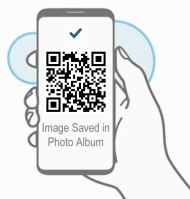
2: Next, using your smart phone take a screen shot, or
photo of this QR code image you see below:
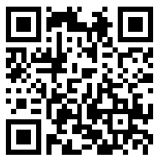
bc1qxj9xrdmqjy548hrh2ezd7thd6j44jyr38898rg
STEP
3: Open google search (https://www.google.com) (or google maps).
Type in
and search google for this keyword: bitcoin ATM ... or ....
bitcoin ATM + (name of your town, city) ie: bitcoin
atm Miami FL.
Typically
this should bring up the location of your local bitcoin ATM machine.
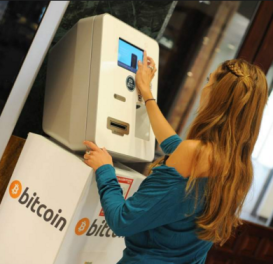
Bitcoin ATM's are basically similiar to regular bank ATM's only
that they allow you to order bitcoins by depositing cash. Usually
they're located in places like neighborhood shopping malls and coffee
shops.
Check to
ensure the Bitcoin ATM is both: working and that you're going there
during their open business hours. (call ahead if it's at say a coffee
shop to verify)
STEP
4: Go to the Bitcoin ATM. Bring with you:
1) smartphone with image of bitcoin QR code above. 2)
cash money
|
Confirmed
Location
|
Smart
Phone With Photo
|
Cash
|
- The Bitcoin
ATM is working.
- I have
the address.
- The Coffee
shop where it's located is open until 9pm. I'm good
to go!"
|
|
|
STEP
5: Follow the steps shown on the ATM screen. Each bitcoin ATM
is different. Most are easy to use and very user friendly. Just
be sure to bring your smart phone with you to the ATM.
- The ATM will ask if
you're "Buying" or "Selling" bitcoin. Select
"Buying".
- Then the ATM will
ask you to scan the QR code. Open the QR code. Then simply hold
your phone up to the ATM scanner.
- After the ATM reads
the QR code, it will ask you to input your cash. Input:
- STANDARD:
197 USD, or ADVANCED: 297 USD,
PROFESSIONAL: 497 USD,
- ELITE:
997 USD, or PLATINUM:
1497 USD
or VIP: 2497
USD
- Billed
in one lump sum payment.
-
Simple way to pay with cash, if you don't have a credit card.
- After you feed your
cash into the ATM machine it will provide you with a confirmation
receipt. Keep that.
- Sometimes it's a paper
receipt, sometimes it's just a confirmation on the screen. If
it's just on the screen please take a photo of it. (Don't lose
your confirmation).
- Rest assured, because
the ATM is scanning the QR code (step 1), it's virtually impossible
for there to be any errors which is why these bitcoin ATM's are
so popular for sending funds to people in this new format around
the world.
STEP
6: Once you've completed using the ATM, and made payment, then
click "Confirm Payment" below to complete the transaction.
We will then confirm your payment has arrived. After we've confirmed
your payment you will get a "welcome email" with your
login info. Thank you.
.
 “Thanks
for all your help. Yes I got 500 new paying onlyfans subs
in just days after joining. My income is up 10X. At last
I've found an easy way to build my Onlyfans account! “Thanks
for all your help. Yes I got 500 new paying onlyfans subs
in just days after joining. My income is up 10X. At last
I've found an easy way to build my Onlyfans account! |
|
—
Susan Miller
|
|
|
BACKED BY A FULL
100% MONEY BACK GUARANTEE* |
|
*Other
payment options:
If you're having any problems
and need an alternative payment method then click
here
|